Repeat layouts
Set repeat rows and columns for a tiled arrangement.
See the Repeat layouts demonstration Squirrel VG
A Squirrel VG workflow
A repeat should join cleanly at the tile boundaries. Work on a simple source tile, then inspect its neighbors to find visible seams before you export.
Start with a blank document and simple geometry. A wave, leaf or geometric motif is easier to test than a dense illustration. Keep the tile size consistent while you design the boundary.
An element leaving one side needs a matching continuation on the opposite side. Check both position and tangent direction when a curve crosses the boundary.
Turn on repeat layouts and inspect row and column joins. Single-tile editing keeps the source in focus; the corner preview gives context without filling the whole workspace.
Repeated objects and a tiled preview serve different purposes. Use the conversion option when you need individual editable copies, and inspect the final pattern at several zoom levels.
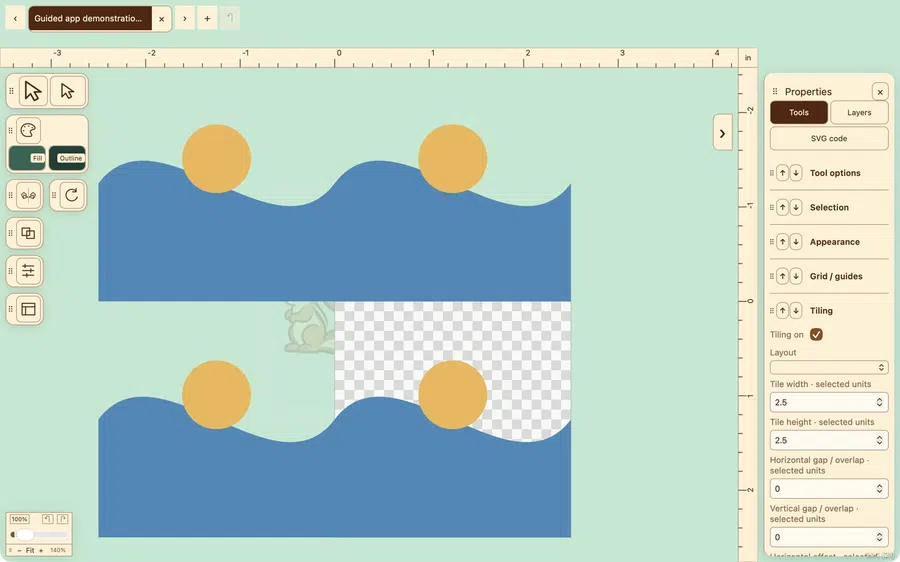
Set repeat rows and columns for a tiled arrangement.
See the Repeat layouts demonstrationWork on the source tile while seeing how it repeats.
See the Single-tile editing demonstrationKeep a resizable repeat preview in a corner while working on one tile.
See the Corner preview demonstrationThis website is a development preview. App Store availability has not been announced. Features vary by device, and preview features still need release validation. Apple Pencil features require compatible hardware. The Watch companion requires the iPhone app.
Basic and Premium labels describe the planned edition split. Basic includes up to five layers, four gradient stops and one perspective vanishing point. The current development app exposes both editions for testing.